
Airtable Interfaces: A True Star Among Airtable Features
Jan 06, 2026Airtable has positioned itself as one of the most powerful no-code tools on the market, combining the simplicity of a spreadsheet with the flexibility of a database. While many businesses are familiar with its core functionalities, there’s one standout feature that’s often underutilized: Airtable Interfaces.
For small businesses, mid-sized companies, and enterprise teams looking to streamline workflows, enhance collaboration, and clean up chaotic data systems, Airtable Interfaces are one of the most strategic features in your toolkit.
What Are Airtable Interfaces?
Airtable Interfaces are intuitive, dynamic front-end views you can build on top of your Airtable base. They allow users to interact with data in a much more focused and polished way, offering curated dashboards, interactive forms, and tailored layouts that cater to different roles within your organization.
Instead of team members sifting through complex tables and columns, interfaces simplify the experience. Think of them as personalized workspaces that only surface what’s important to the user. Whether you're a project manager overseeing tasks or an executive monitoring performance KPIs, Interfaces ensure you see what you need, no distractions, no clutter.
Why Airtable Interfaces Matter More Than Ever
As an Airtable Service Partner, we’ve worked with clients across a wide range of industries who were initially overwhelmed by messy bases or inefficient access restrictions. Here’s how Airtable Interfaces helped solve major challenges.
1. Workflow Clarity and Customization
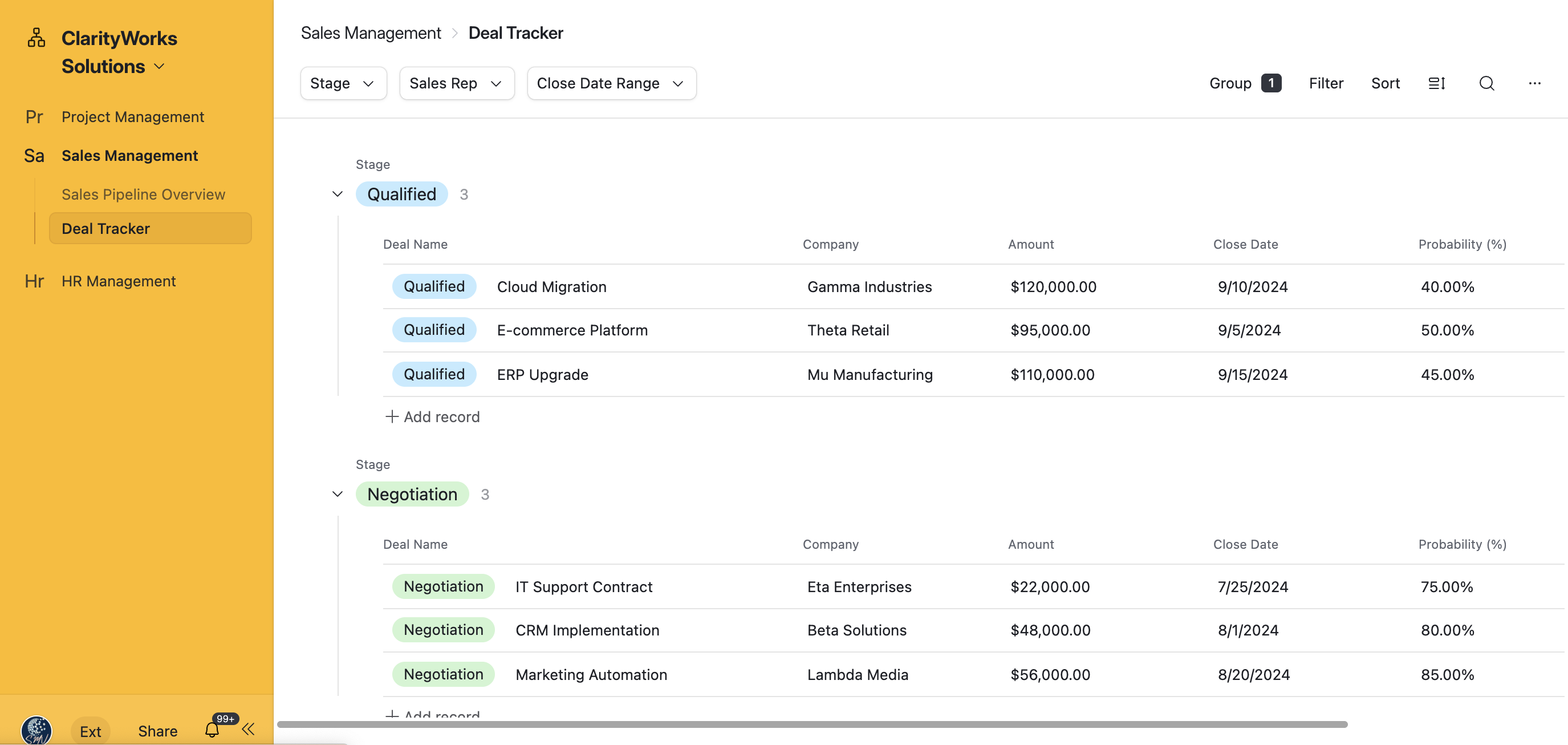
Every team has different priorities. Interfaces give you the ability to create custom views for each department or role:
- Project teams see task status, deadlines, and dependencies
- Sales leaders monitor pipeline progression and revenue forecasting
- HR teams track onboarding checklists and applicant pipelines
With drag-and-drop layouts, you can design user experiences without involving developers or writing new apps. These tailored workspaces lead to less friction, faster training, and better team alignment.
2. Enhanced Collaboration Across Teams
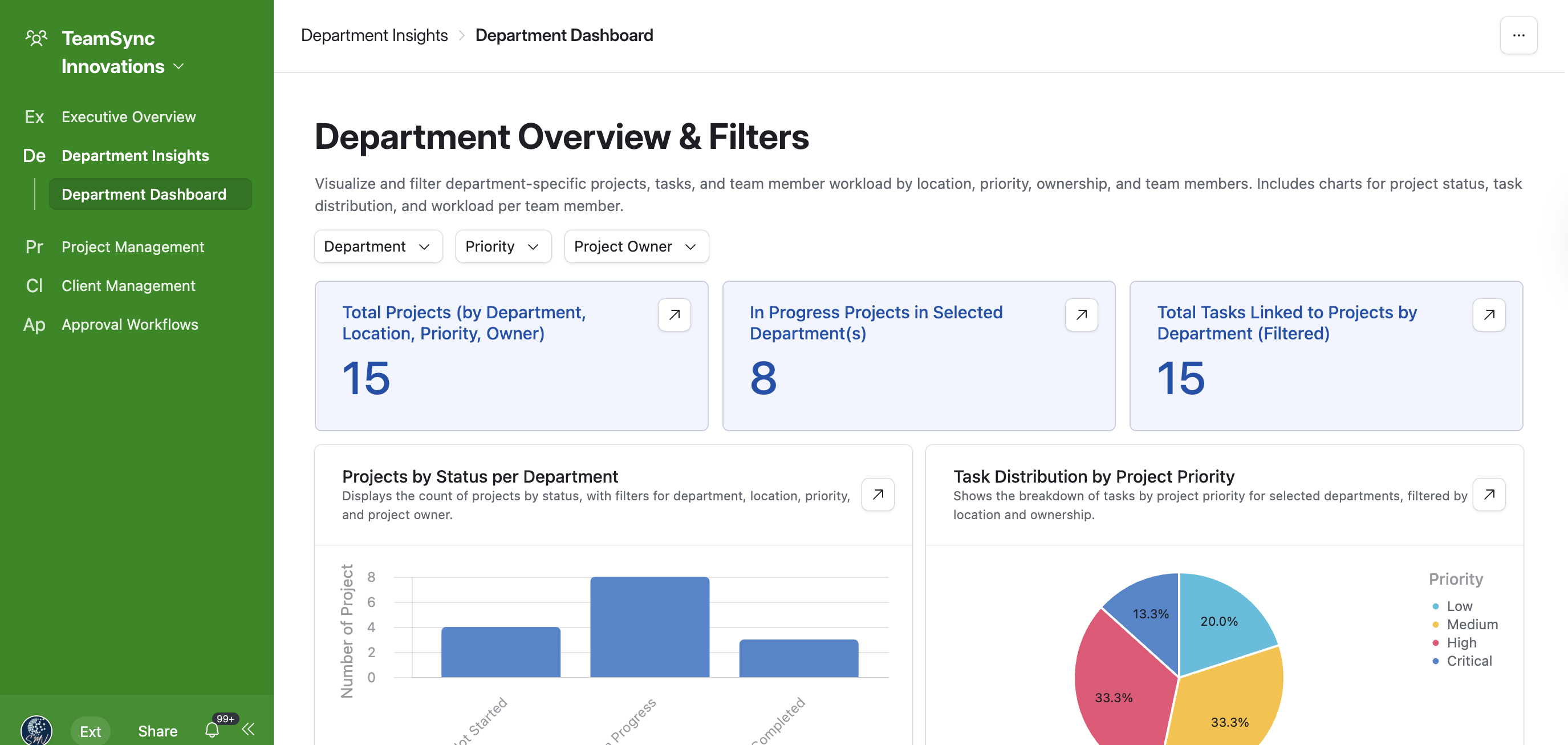
Airtable Interfaces for Teams create bridges between roles by providing each group with focused access. Rather than navigating through multiple tables or asking for updates manually, each team interacts with Interfaces that are built specifically for their function.
For example:
- Leadership dashboards with high-level KPIs and progress summaries
- Department-specific results filtered by location, priority, or ownership
- Embedded workflows that walk team members through tasks step by step
Bringing clarity to data means fewer miscommunications, reduced redundancy, and more informed decisions across the board.
3. Built-In Security and Permissions
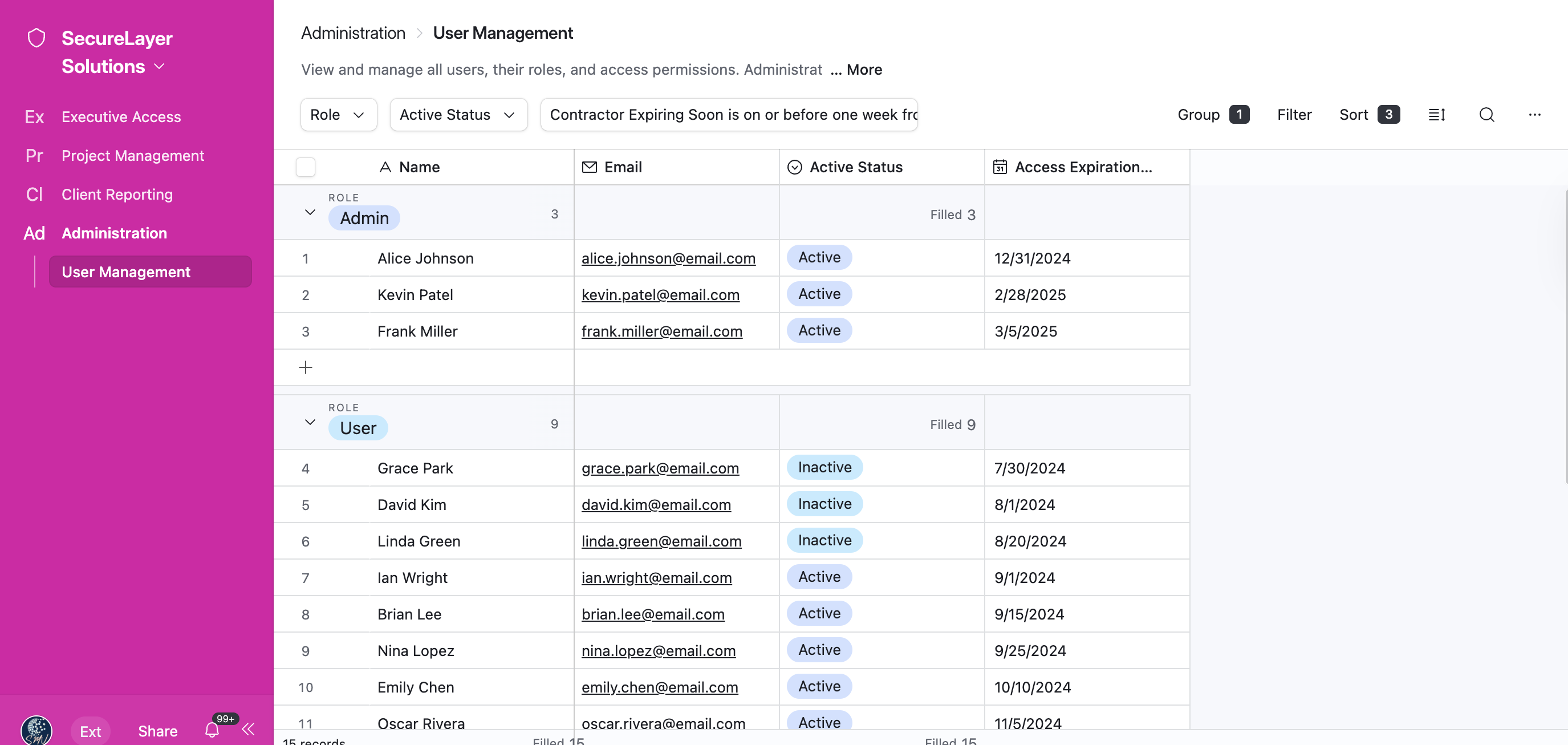
Managing who sees what is essential at scale. Airtable Interfaces for Security and Permissions allow you to display different information to different users, without compromising the integrity of your base.
Through interface-specific filtering and Airtable’s permission controls, organizations can limit data views, edit rights, or actions based on roles. This ensures sensitive information remains confidential while promoting broader collaboration wherever appropriate.
For example:
- Limit financial dashboards to executives only
- Make task boards editable by project coordinators, but view-only for clients
- Create temporary contractor access to client reporting tools
This level of segmentation makes it easy to run sophisticated operations from within Airtable, without extra apps or external systems.
Real Success: How Businesses Use Airtable Interfaces
Here’s a closer look at a few ways our clients at SMV Virtual Consulting have successfully implemented Airtable Interfaces to improve efficiency and performance.
Case Study: Marketing Agency Harmonizes Creative and Client Workflows
A 15-person marketing agency came to us with fragmented processes. Designers were buried in email threads. Clients lacked visibility. Team leaders couldn’t track workloads.
We built a set of Airtable Interfaces segmented by role:
- Designers had a kanban-style dashboard with upcoming assets and feedback
- Account managers tracked campaign status and client correspondence
- Executives got a high-level view of project loads and client value
The results? Reduced bottlenecks, quicker approvals, and a boost in client satisfaction.
Case Study: Manufacturing Teams and Inventory Visibility
A growing manufacturer needed a better way to manage raw materials across four facilities. Their spreadsheets were prone to errors and lacked real-time updates.
SMV Virtual Consulting created Airtable Interfaces that:
- Allowed facility managers to log inventory updates directly
- Gave purchasing teams accurate reorder triggers instantly
- Provided executives with daily supply chain dashboards
With Interfaces in place, restocking delays dropped by over 60 percent.
Airtable Interfaces vs. the Traditional UI
The default Airtable experience is powerful, but it’s also very database-centric. Without Interfaces, new users often get lost navigating tables. The format can overwhelm non-technical team members or executives who want a cleaner view.
Interfaces are the bridge between data and decision making. They strip away noise and emphasize what matters. This shift leads to smarter use, fewer questions, and increased adoption across departments.
Key Takeaways
- Airtable Interfaces provide custom, interactive dashboards built directly on your existing base
- Great for cross-functional teams—they tailor views by role or department
- Help reinforce Airtable Interfaces for Teams and ensure better adoption and engagement
- Airtable Interfaces for Security and Permissions mean you can safely control what users see or edit
- Simple to build, fast to scale—ideal for small businesses and enterprise alike
Businesses that ignore Interfaces are overlooking one of Airtable’s most powerful advantages.
Ready to Design Your Interface for Success?
At SMV Virtual Consulting, we specialize in helping businesses unlock the full potential of Airtable. As a Certified Airtable Service Partner, we work closely with teams to create workflows, dashboards, and systems that drive clarity, efficiency, and measurable results.
If your Airtable setup feels underwhelming or difficult to manage, it’s time to leverage Interfaces the right way.
📞 Schedule a free discovery call today and let’s build better systems together.
Explore more of our Airtable services and see how we transform cluttered workflows into clean, scalable solutions.
Let your data tell a better story with Airtable Interfaces guiding the way.
Don't miss a beat!
Sign up for newsletter to catch our latest tutorial videos and blog posts.